the free rack · a guided tour

your first 10 minutes with tangle

Installed it and not sure where to start? Scroll, and the rack walks you through itself: where sound comes in and goes out, how to add a module and patch it, how to make it move, and the buttons that roll a whole new patch when you want a surprise. Not installed yet? Start with the install walkthrough.

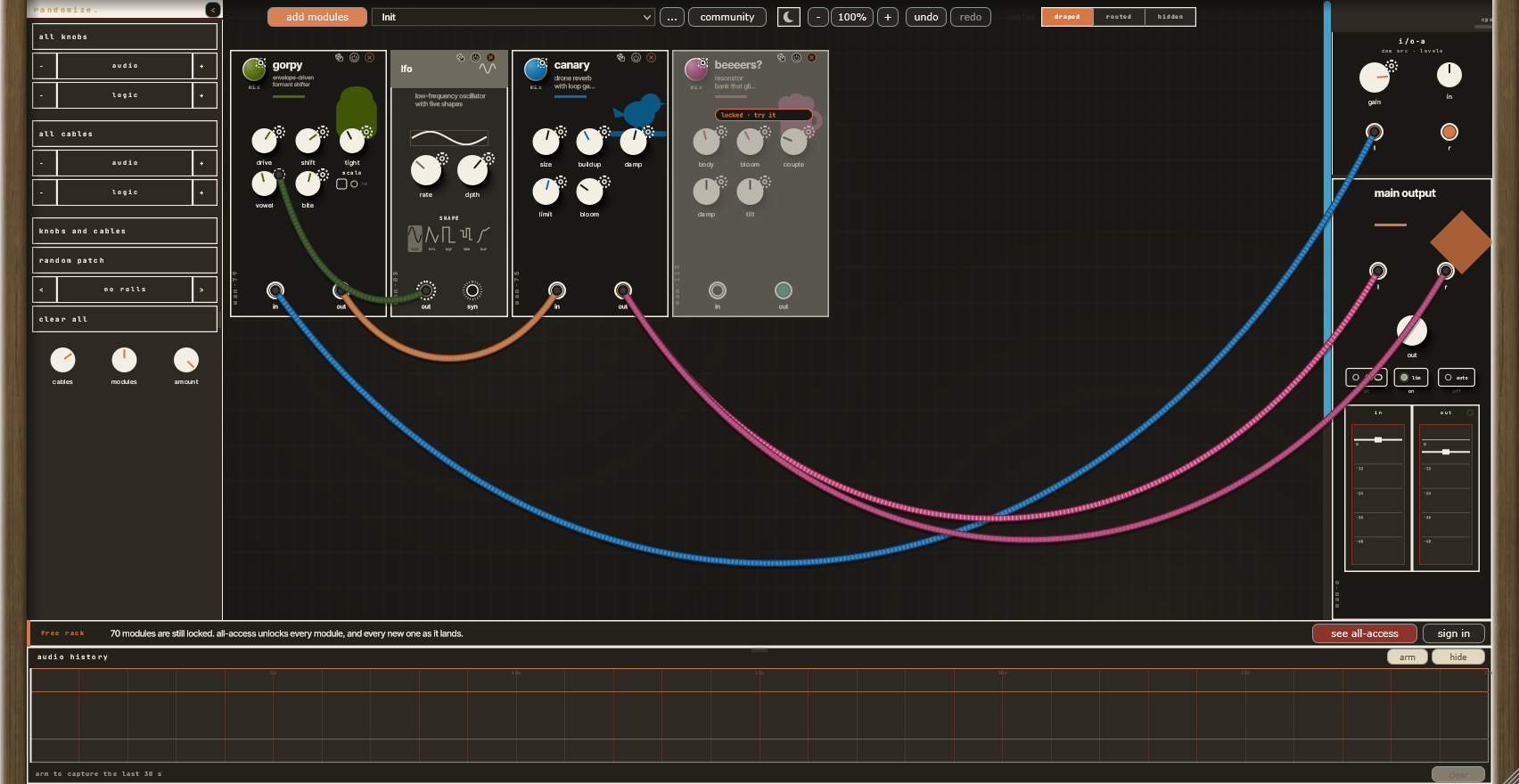
The Tangle rack, signed out: Gorpy, an LFO and Canary patched between the DAW input and the main output, and one locked module.
minute 0

this is the rack

Add Tangle to an audio track in your DAW and open its window. Modules sit in the middle, sound comes in and goes out on the right, the randomize shelf runs down the left, and everything else lives along the top.

This is the rack exactly as a new free account sees it: three modules patched together, and one that's locked.

minute 1

sound in, sound out

Your track's audio arrives at i/o-a, top right. Its l and r jacks are the sound coming in from your DAW, and gain and in set how hot it arrives.

It leaves through main output below it. out sets the level and lim is a safety limiter. The in and out meters show the level: drag a meter's handle to set its gain, and double-click to reset it.

Whatever you patch between the two is what you hear.

minute 2

add a module

add modules opens the whole catalogue, grouped by family, with a search box at the top. Pick one and it lands on the rack.

Six audio modules are free for good: Canary (reverb), Long Tan (delay), Gorpy (filter), Flanger Turnout 2, Monster Energy (lo-fi) and Salt of the Earth (drive). So are the modulators and utilities: LFO, curve, noise, clock, envelope follower and the rest.

Modules you don't own yet still show, greyed, and you can still pick them. More on that in minute 6.

Tip: right-click empty rack space to search right where you clicked.

minute 3

patch a chain

Drag from one jack to another to make a cable. It snaps on when you get close.

Here, i/o-a's l runs into Gorpy's in, Gorpy's out into Canary's in, and Canary's out into main output's l and r. That's a complete chain: your track, through a filter, into a reverb, out.

Click the middle of a cable to remove it. Grab a cable near one end to pick that end up and plug it in somewhere else.

minute 4

a module, up close

Turn any knob. The small dial beside the title is mix, how much of the effect you hear against the dry sound. Hover the title for a one-line description of what the module does.

The three icons top right: the die randomizes just this module's knobs, the power icon bypasses it, and x removes it.

Drag a module by its header to move it. Right-click it for its presets, to duplicate it, or to pin it so randomize leaves it alone.

minute 5

make it move

Modulators don't make sound; they move things. Every knob has a small CV jack at its top right, the little cog. Patch the LFO's out into the one on Gorpy's vowel knob and the knob sweeps by itself.

Try the same with a curve, the noise or the envelope follower, and stack a few on one module. Even the mix dial has one.

minute 6

try a locked module

A module you don't own sits greyed out with a locked · try it tag, and it stays silent. Click the tag:

  • try it for 15 min plays it right there in your patch. You get one try a day per module.
  • start free trial unlocks it for 14 days.
  • see options shows the ways to keep it.

While you're trying one, its tag counts down, and clicking it shows the ways to keep it.

minute 7

roll the dice

random patch is the biggest hammer: it rolls which modules are on the rack, every knob and every cable. Press it a few times.

all knobs and all cables re-roll just those, leaving the rest alone. Their audio and logic rows narrow it to one kind of module or cable, and - and + drop or add some.

The arrows either side of the roll counter step back through your recent rolls, so the one you liked is never lost. clear all empties the rack, and undo brings it back. The cables, modules and amount knobs set how busy a roll is.

minute 8

presets and patches

The preset box starts at Init. Its factory folder has finished racks to load and pull apart, and a * after the name means you've changed it since it loaded.

The … menu next to it saves your rack as a new preset, and can copy patch to clipboard or paste patch from clipboard, so you can send a whole rack to a friend as text.

minute 8½

the community

community opens patches other Tangle users have shared. Click one and it loads into your rack. Any module in it that you don't own loads locked, and you can try it from its tag.

Made something you like? Name it and press share in the same window. Sharing needs you signed in, which is free.

minute 9

undo, zoom, and how it looks

undo and redo cover everything, rolls included (ctrl/cmd+z). Zoom runs from 50% to 200%, or hold ctrl/cmd and scroll over the rack.

cables switches how they're drawn: draped, routed around the modules, or hidden until you hover a jack. The sun and moon switch between the light and dark themes.

minute 9½

keep what you just played

Press arm on the audio history strip and it keeps the last 30 seconds of the rack's output. Happy accident? Drag a selection straight out into your DAW.

minute 10

sign in once

sign in links the rack to your free Weaver Audio account. Your trials and anything you buy then unlock on every computer you use.

The bar stays while any module is locked. see all-access is the subscription that opens every module, and every new one as it lands.